Mastering Google's Interactions API: A Unified Gateway to Gemini Models and Deep Research Agent

The AI development landscape is shifting from stateless request-response patterns to stateful, multi-turn agentic workflows. Google's new Interactions API provides a unified interface designed specifically for this new era—offering a single gateway to both raw Gemini models and the fully managed Deep Research Agent.
In one sentence: The Interactions API is a unified endpoint for interacting with Gemini models and agents, featuring server-side state management, background execution for long-running tasks, and native support for the Deep Research Agent.
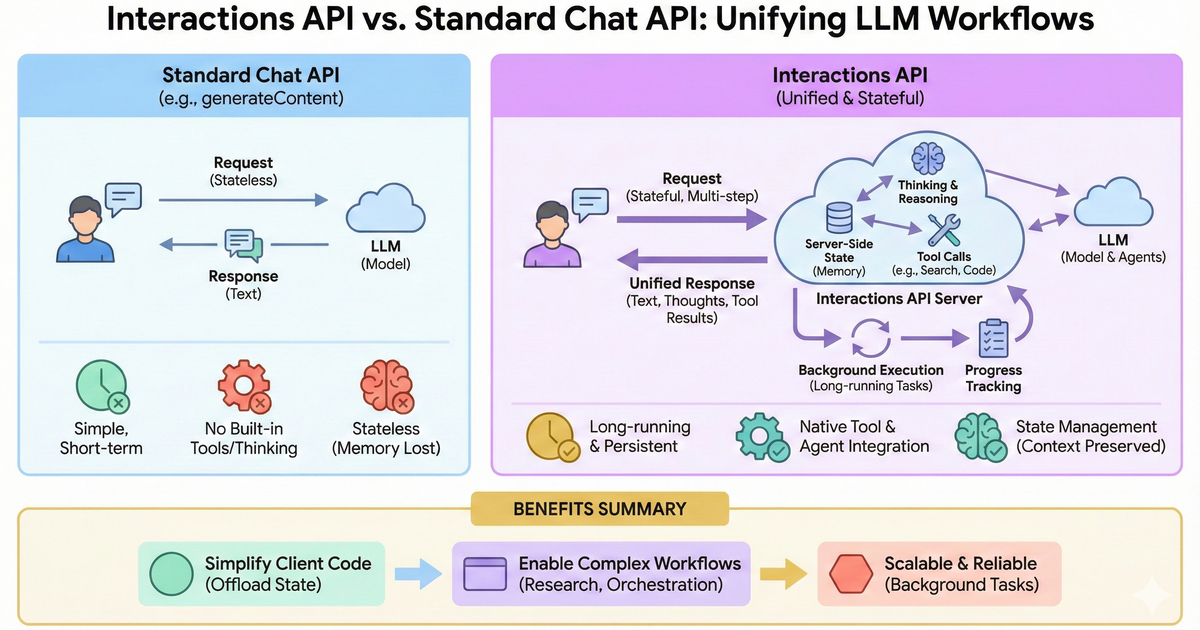
Why the Interactions API Matters
The Evolution from generateContent to Interactions
The original generateContent API was designed for stateless request-response text generation—perfect for chatbots and simple completion tasks. But as AI applications evolve toward agentic patterns, developers need more sophisticated capabilities:
| Challenge | generateContent | Interactions API |
|---|---|---|
| State Management | Client-side only | Server-side with previous_interaction_id |
| Long-running Tasks | Timeouts | Background execution with polling |
| Agent Access | Models only | Models AND built-in agents |
| Tool Orchestration | Basic function calling | Native MCP, Google Search, Code Execution |
| Conversation History | Manual management | Automatic with session IDs |
Key Benefits
- Server-Side State Management: Offload conversation history to the server, reducing client complexity
- Background Execution: Run multi-hour research tasks without maintaining client connections
- Unified Endpoint: Same API for models (
gemini-3-pro-preview) and agents (deep-research-pro-preview-12-2025) - Remote MCP Support: Models can directly call Model Context Protocol servers
- Improved Cache Hits: Server-managed state enables better context caching, reducing costs
Getting Started
Prerequisites
# Install the latest google-genai SDK (1.55.0+ required)
pip install "google-genai>=1.55.0"

# Set your API key
export GOOGLE_API_KEY="your-api-key-here"
Basic Interaction
The simplest way to use the Interactions API:
from google import genai

client = genai.Client()

# Create an interaction
interaction = client.interactions.create(
    model="gemini-2.5-flash",
    input="Tell me a short joke about programming."
)

print(interaction.outputs[-1].text)
- Python:
google-genai>=1.55.0 - JavaScript:
@google/genai>=1.33.0
Stateful Conversations
One of the most powerful features is server-side state management. Instead of sending the entire conversation history with each request, you reference the previous interaction:
Server-Side State (Recommended)
from google import genai

client = genai.Client()

# First turn
interaction1 = client.interactions.create(
    model="gemini-2.5-flash",
    input="Hi, my name is Alex."
)
print(f"Model: {interaction1.outputs[-1].text}")

# Second turn - context preserved automatically!
interaction2 = client.interactions.create(
    model="gemini-2.5-flash",
    input="What is my name?",
    previous_interaction_id=interaction1.id
)
print(f"Model: {interaction2.outputs[-1].text}")
# Output: "Your name is Alex."
Benefits of Server-Side State
- Reduced Token Costs: No need to resend full history
- Improved Cache Hits: Server can cache context more efficiently
- Simpler Client Code: No local state management needed
- Reliable Context: Server ensures consistency
Retrieving Past Interactions
# Get a previous interaction by ID
previous = client.interactions.get("<YOUR_INTERACTION_ID>")
print(previous.outputs[-1].text)
Deep Research Agent
The Deep Research Agent (deep-research-pro-preview-12-2025) is a game-changer for autonomous research tasks. Powered by Gemini 3 Pro, it autonomously plans, executes, and synthesizes multi-step research tasks.
When to Use Deep Research
| Use Case | Deep Research | Standard Model |
|---|---|---|
| Latency | Minutes (async) | Seconds |
| Process | Plan → Search → Read → Iterate → Output | Generate → Output |
| Output | Detailed reports with citations | Conversational text |
| Best For | Market analysis, due diligence, literature reviews | Chat, extraction, creative writing |
Basic Deep Research
import time
from google import genai

client = genai.Client()

# Start research in background
interaction = client.interactions.create(
    input="Research the competitive landscape of AI code assistants in 2025.",
    agent="deep-research-pro-preview-12-2025",
    background=True  # Required for agents
)

print(f"Research started: {interaction.id}")

# Poll for completion
while True:
    interaction = client.interactions.get(interaction.id)
    print(f"Status: {interaction.status}")

    if interaction.status == "completed":
        print("\n📊 Research Report:\n")
        print(interaction.outputs[-1].text)
        break
    elif interaction.status == "failed":
        print(f"Research failed: {interaction.error}")
        break

    time.sleep(10)  # Poll every 10 seconds
Streaming Deep Research with Progress Updates
For real-time progress updates during research:
from google import genai

client = genai.Client()

stream = client.interactions.create(
    input="Research the history of Google TPUs.",
    agent="deep-research-pro-preview-12-2025",
    background=True,
    stream=True,
    agent_config={
        "type": "deep-research",
        "thinking_summaries": "auto"  # Enable thought streaming
    }
)

interaction_id = None
last_event_id = None

for chunk in stream:
    if chunk.event_type == "interaction.start":
        interaction_id = chunk.interaction.id
        print(f"🚀 Research started: {interaction_id}")

    if chunk.event_id:
        last_event_id = chunk.event_id

    if chunk.event_type == "content.delta":
        if chunk.delta.type == "text":
            print(chunk.delta.text, end="", flush=True)
        elif chunk.delta.type == "thought_summary":
            print(f"💭 Thought: {chunk.delta.content.text}", flush=True)

    elif chunk.event_type == "interaction.complete":
        print("\n✅ Research Complete")
Research with Custom Formatting
You can steer the agent's output with specific formatting instructions:
prompt = """
Research the competitive landscape of EV batteries.

Format the output as a technical report with:
1. Executive Summary (max 200 words)
2. Key Players (include a comparison table with columns: Company, Capacity, Chemistry, Market Share)
3. Supply Chain Risks (bullet points)
4. Future Outlook (2025-2030)

Use clear headers and include citations for all claims.
"""

interaction = client.interactions.create(
    input=prompt,
    agent="deep-research-pro-preview-12-2025",
    background=True
)
Follow-up Questions
Continue conversations after the research completes:
# After research is complete
follow_up = client.interactions.create(
    input="Can you elaborate on the third key player you mentioned?",
    model="gemini-3-pro-preview",  # Can use a model for follow-ups
    previous_interaction_id=completed_interaction.id
)
print(follow_up.outputs[-1].text)
Function Calling with Interactions API
The Interactions API provides robust function calling capabilities:
from google import genai

client = genai.Client()

# Define the tool
def get_weather(location: str) -> str:
    """Gets current weather for a location."""
    # Your implementation here
    return f"The weather in {location} is sunny and 72°F."

weather_tool = {
    "type": "function",
    "name": "get_weather",
    "description": "Gets the weather for a given location.",
    "parameters": {
        "type": "object",
        "properties": {
            "location": {
                "type": "string",
                "description": "The city and state, e.g. San Francisco, CA"
            }
        },
        "required": ["location"]
    }
}

# Send request with tool
interaction = client.interactions.create(
    model="gemini-2.5-flash",
    input="What is the weather in Paris?",
    tools=[weather_tool]
)

# Handle tool call
for output in interaction.outputs:
    if output.type == "function_call":
        print(f"Tool Call: {output.name}({output.arguments})")

        # Execute the tool
        result = get_weather(**output.arguments)

        # Send result back
        interaction = client.interactions.create(
            model="gemini-2.5-flash",
            previous_interaction_id=interaction.id,
            input=[{
                "type": "function_result",
                "name": output.name,
                "call_id": output.id,
                "result": result
            }]
        )
        print(f"Response: {interaction.outputs[-1].text}")
Built-in Tools
The Interactions API provides access to powerful built-in tools:
Google Search Grounding
interaction = client.interactions.create(
    model="gemini-2.5-flash",
    input="Who won the 2024 Super Bowl?",
    tools=[{"type": "google_search"}]
)

# Get the text output (filtering search results)
text_output = next((o for o in interaction.outputs if o.type == "text"), None)
if text_output:
    print(text_output.text)
Code Execution
interaction = client.interactions.create(
    model="gemini-2.5-flash",
    input="Calculate the 50th Fibonacci number.",
    tools=[{"type": "code_execution"}]
)
print(interaction.outputs[-1].text)
URL Context
interaction = client.interactions.create(
    model="gemini-2.5-flash",
    input="Summarize the content of https://google.github.io/adk-docs/",
    tools=[{"type": "url_context"}]
)
print(interaction.outputs[-1].text)
Remote MCP Servers
mcp_server = {
    "type": "mcp_server",
    "name": "weather_service",
    "url": "https://your-mcp-server.example.com/mcp"
}

interaction = client.interactions.create(
    model="gemini-2.5-flash",
    input="What is the weather like in New York?",
    tools=[mcp_server]
)
print(interaction.outputs[-1].text)
Integration with Google ADK
The Interactions API integrates seamlessly with the Agent Development Kit (ADK):
ADK Agent with Interactions Backend
from google.adk.agents import Agent
from google.adk.models.google_llm import Gemini
from google.adk.tools.google_search_tool import GoogleSearchTool

def get_current_weather(location: str) -> dict:
    """Get weather for a location."""
    return {
        "status": "success",
        "location": location,
        "temperature": "72°F",
        "conditions": "Sunny"
    }

# Create agent with Interactions API enabled
root_agent = Agent(
    model=Gemini(
        model="gemini-2.5-flash",
        use_interactions_api=True  # Enable Interactions API!
    ),
    name="interactions_enabled_agent",
    description="An agent powered by the Interactions API",
    instruction="""You are a helpful assistant with access to:
    - Google Search for current information
    - Weather data for location queries

    Always provide accurate, well-sourced information.""",
    tools=[
        GoogleSearchTool(bypass_multi_tools_limit=True),
        get_current_weather,
    ],
)
Benefits for ADK Developers
- Automatic State Management: ADK handles
previous_interaction_idfor you - Background Task Support: Long-running agents don't timeout
- Native Thought Handling: Access to model reasoning chains
- Unified Tool Experience: Same tools work across models and agents
Multimodal Capabilities
The Interactions API supports multimodal inputs:
Image Understanding
import base64
from pathlib import Path

with open("image.png", "rb") as f:
    base64_image = base64.b64encode(f.read()).decode('utf-8')

interaction = client.interactions.create(
    model="gemini-2.5-flash",
    input=[
        {"type": "text", "text": "Describe what you see in this image."},
        {"type": "image", "data": base64_image, "mime_type": "image/png"}
    ]
)
print(interaction.outputs[-1].text)
Image Generation
interaction = client.interactions.create(
    model="gemini-3-pro-image-preview",
    input="Generate an image of a futuristic AI research lab.",
    response_modalities=["IMAGE"]
)

for output in interaction.outputs:
    if output.type == "image":
        with open("generated_lab.png", "wb") as f:
            f.write(base64.b64decode(output.data))
        print("Image saved!")
Structured Output
Enforce specific JSON output schemas:
from pydantic import BaseModel, Field
from typing import Literal

class ContentModeration(BaseModel):
    is_safe: bool = Field(description="Whether the content is safe")
    category: Literal["safe", "spam", "inappropriate", "harmful"]
    confidence: float = Field(ge=0, le=1, description="Confidence score")
    reason: str = Field(description="Explanation for the classification")

interaction = client.interactions.create(
    model="gemini-2.5-flash",
    input="Moderate: 'Free money! Click here to claim your prize!'",
    response_format=ContentModeration.model_json_schema()
)

result = ContentModeration.model_validate_json(interaction.outputs[-1].text)
print(f"Safe: {result.is_safe}, Category: {result.category}")
Data Storage and Retention
Important considerations for stored interactions:
| Tier | Retention Period |
|---|---|
| Paid | 55 days |
| Free | 1 day |
Opting Out of Storage
# Disable storage (cannot use with background=True)
interaction = client.interactions.create(
    model="gemini-2.5-flash",
    input="Process this privately",
    store=False  # Opt out of storage
)
Deleting Interactions
# Delete a specific interaction
client.interactions.delete(interaction_id="<INTERACTION_ID>")
Best Practices
1. Use Server-Side State for Conversations
# ✅ Good: Server manages history
interaction2 = client.interactions.create(
    model="gemini-2.5-flash",
    input="Continue our discussion",
    previous_interaction_id=interaction1.id
)

# ❌ Avoid: Sending full history each time
interaction2 = client.interactions.create(
    model="gemini-2.5-flash",
    input=[...entire_conversation_history...]  # Expensive!
)
2. Always Use background=True for Agents
# ✅ Required for agents like Deep Research
interaction = client.interactions.create(
    agent="deep-research-pro-preview-12-2025",
    input="Research task",
    background=True
)
3. Handle Long-Running Tasks with Resilience
import time

def run_research_with_retry(prompt: str, max_retries: int = 3):
    """Run research with automatic retry on failure."""
    interaction = client.interactions.create(
        agent="deep-research-pro-preview-12-2025",
        input=prompt,
        background=True
    )

    retries = 0
    while retries < max_retries:
        try:
            while True:
                status = client.interactions.get(interaction.id)
                if status.status == "completed":
                    return status.outputs[-1].text
                elif status.status == "failed":
                    raise Exception(status.error)
                time.sleep(10)
        except Exception as e:
            retries += 1
            if retries >= max_retries:
                raise
            time.sleep(30)
4. Mix Models and Agents in Conversations
# Start with Deep Research
research = client.interactions.create(
    agent="deep-research-pro-preview-12-2025",
    input="Research quantum computing applications",
    background=True
)
# ... poll for completion ...

# Follow up with a standard model
summary = client.interactions.create(
    model="gemini-2.5-flash",
    input="Summarize the key points for a non-technical audience",
    previous_interaction_id=research.id
)
Supported Models and Agents
| Name | Type | Identifier |
|---|---|---|
| Gemini 2.5 Pro | Model | gemini-2.5-pro |
| Gemini 2.5 Flash | Model | gemini-2.5-flash |
| Gemini 2.5 Flash-lite | Model | gemini-2.5-flash-lite |
| Gemini 3 Pro Preview | Model | gemini-3-pro-preview |
| Deep Research Preview | Agent | deep-research-pro-preview-12-2025 |
Current Limitations
The Interactions API is in public beta. Features and schemas may change.
-
Not Yet Supported:
- Grounding with Google Maps
- Computer Use
- Combining MCP + Function Calling + Built-in tools in single request
-
Deep Research Specific:
- Maximum research time: 60 minutes (most complete in ~20 minutes)
- No custom function calling tools
- No structured output or plan approval
- Audio inputs not supported
-
Storage Requirements:
background=Truerequiresstore=True
Migration Guide
When to Use Interactions API vs generateContent
| Scenario | Recommended API |
|---|---|
| Simple text completion | generateContent |
| Standard chatbot | generateContent |
| Production critical | generateContent |
| Agentic workflows | Interactions API |
| Long-running research | Interactions API |
| Complex tool orchestration | Interactions API |
| Multi-hour background tasks | Interactions API |
| MCP server integration | Interactions API |
Try It Yourself
We've created complete working examples in the tutorial_blog_implementation/ directory:
-
Basic Interactions: Simple conversations and state management
-
Deep Research Agent: Autonomous research with progress streaming
-
ADK Integration: Using Interactions API with Google ADK
Each example includes:
- ✅ Working Python code
- ✅ Comprehensive tests (
make test) - ✅ Interactive demos (
make demo) - ✅ Makefile with setup and development commands
Resources
- Interactions API Documentation
- Deep Research Agent Guide
- ADK Documentation
- ADK Interactions Sample
- Google AI Studio (Get your API key)
Conclusion
The Interactions API represents a significant evolution in how we build AI applications. By providing:
- Server-side state management for simpler, more reliable conversations
- Background execution for long-running agentic tasks
- Unified access to both models and specialized agents like Deep Research
- Native tool integration with MCP, Google Search, and more
...developers can now build sophisticated AI systems with less boilerplate and better reliability.
Whether you're building a research assistant, a multi-turn customer support agent, or a complex agentic workflow, the Interactions API provides the foundation for next-generation AI applications.
💬 Join the Discussion
Have questions or feedback? Discuss this tutorial with the community on GitHub Discussions.