Context Engineering: Inside Google's Architecture for Production AI Agents

The progression of Generative AI from novelty to enterprise cornerstone has necessitated a fundamental shift in system construction methodology. Early LLM adoption emphasized "prompt engineering"—ad-hoc string concatenation, trial-and-error phrasing, and minimal state management. While sufficient for simple chatbots, this approach collapses under production demands: reliability, observability, latency, and cost-efficiency.
The Google Gen AI Agent Development Kit (ADK) signals the arrival of Context Engineering—a discipline that treats context not as a mutable string buffer but as a compiled view over rich stateful systems.

1. Introduction: The Industrialization of Agency and the Context Engineering Paradigm
1.1 The Necessity of a Framework
Why does the industry need a specialized agent framework? The answer lies in complexity explosion. An agent is not merely a model; it is a system that perceives, reasons, acts, and remembers. Managing conversation lifecycle, state persistence, secure tool execution, and task delegation requires machinery that raw API calls cannot provide.
The ADK fills this gap with a modular, model-agnostic, deployment-agnostic framework applying standard software development principles to AI agent creation. It provides scaffolding—Flows, Processors, Session Services, Memory Banks—allowing developers to focus on cognitive logic rather than infrastructure plumbing.
2. Architectural Philosophy: Context as a First-Class System
To master the ADK, internalize its core thesis: context is a dynamic, engineered resource requiring active management to prevent cognitive overload and financial waste.
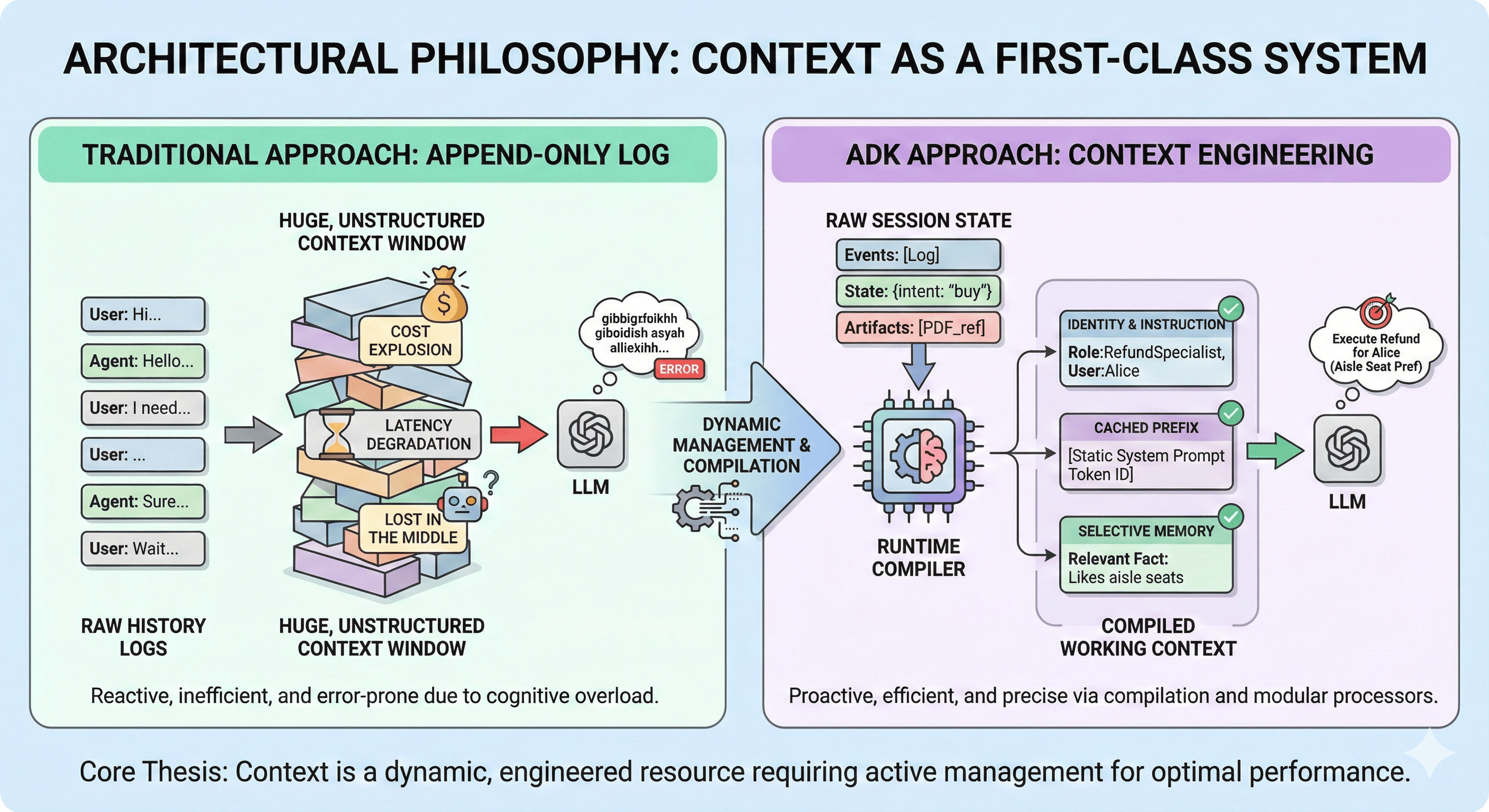
2.1 The "Why": Solving the Context Window Dilemma
The "append-only log" approach causes three critical failures:
- Cost Explosion: Entire history sent every turn = linear token consumption growth
- Latency Degradation: Larger contexts = longer processing = degraded UX
- Lost in the Middle: Models struggle with instructions buried in massive context windows
By viewing context as a system with its own architecture, ADK enables Context Compaction, Caching, and Selective Injection.
The Working Context—the actual prompt sent to the LLM—is not raw history; it is a compiled view. Just as compilers transform high-level code into optimized machine code, the ADK Runtime transforms session state (history, variables, artifacts) into an optimized context window tailored for the specific turn.
2.2 The Compiler Pipeline Analogy
This manifests in Flows and Processors. The compilation pipeline consists of processor sequences acting on raw requests:
- One processor injects agent identity
- Another retrieves relevant long-term memories
- A third checks for cached context prefixes to optimize inference speed
This modularity allows architects to "program" the context window, inserting custom logic for filtering, sanitization, or augmentation without rewriting the core agent.
3. The Agentic Unit: Anatomy and Configuration
The ADK Agent is a composable unit of logic defined by strict configuration contracts.
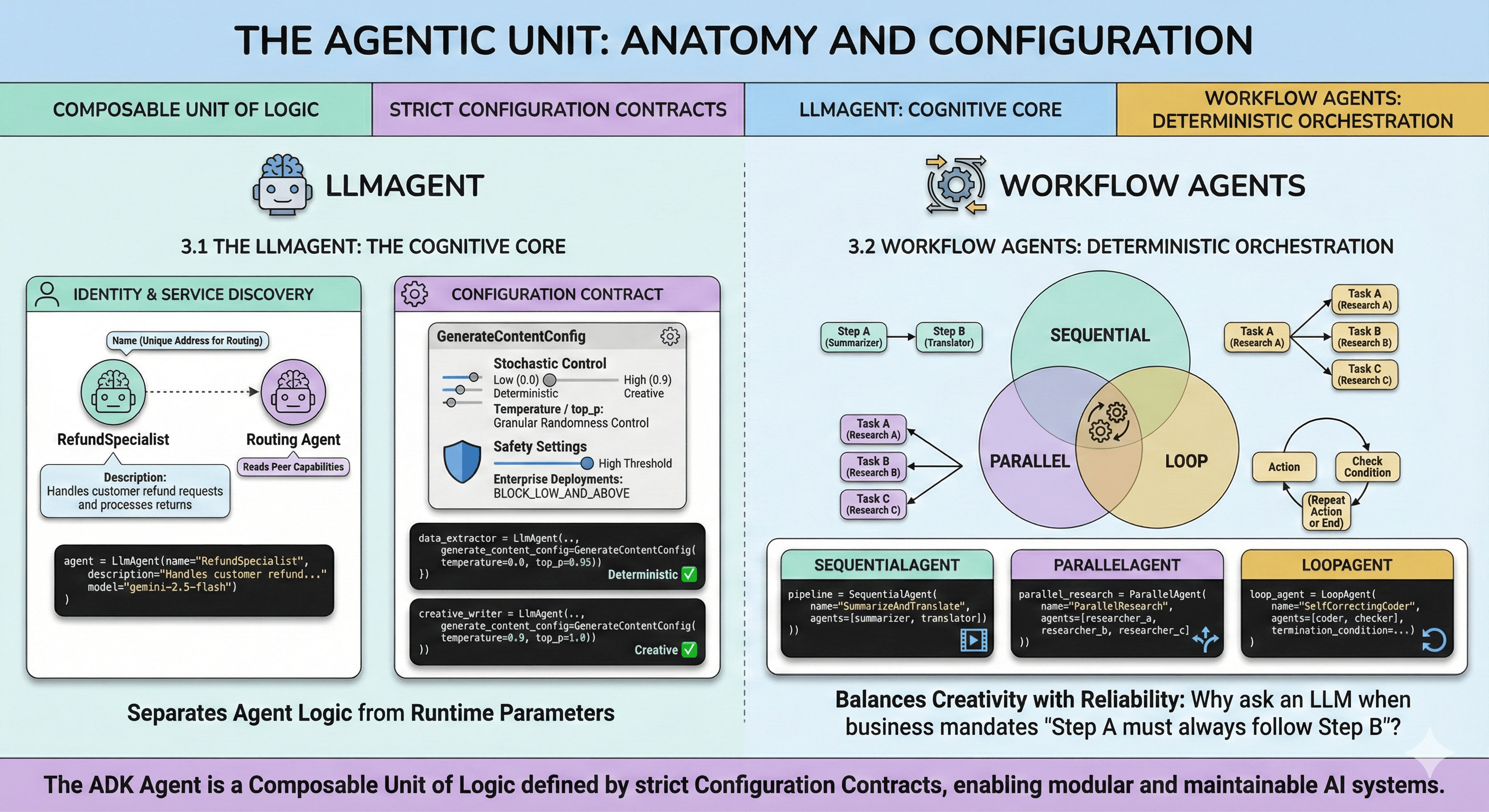
3.1 The LlmAgent: The Cognitive Core
The LlmAgent represents an entity using an LLM to reason and act.
3.1.1 Identity and Service Discovery
Every agent requires a unique name and description. In Multi-Agent Systems, these fields serve as the "Service Discovery" mechanism:
- Name: Unique address for routing delegation
- Description: Semantic interface read by other agents (routing agents) to understand peer capabilities
A description like "Handles customer refunds" allows a Root Agent to intelligently route refund requests without knowing internal implementation.
from google.adk.agents import LlmAgent

# Basic agent configuration with identity
agent = LlmAgent(
    name="RefundSpecialist",
    description="Handles customer refund requests and processes returns",
    model="gemini-2.5-flash",
)
3.1.2 The Configuration Contract
ADK enforces rigorous separation between agent logic and runtime parameters via LlmAgent configuration, including GenerateContentConfig:
- Stochastic Control (temperature, top_p): Granular randomness control. Creative Writing Agent requires high temperature (0.9) for novel content; Data Extraction Agent requires near-zero temperature for deterministic, valid JSON output.
- Safety Settings: Enterprise deployments require strict safety guidelines. ADK allows defining safety thresholds directly in agent config, ensuring safety is a compiled property.
from google.adk.agents import LlmAgent
from google.genai.types import GenerateContentConfig

# Configure agent with precise generation parameters
data_extractor = LlmAgent(
    name="DataExtractor",
    model="gemini-2.5-flash",
    generate_content_config=GenerateContentConfig(
        temperature=0.0,  # Deterministic output for structured data
        top_p=0.95,
    ),
)

# Creative agent with higher temperature
creative_writer = LlmAgent(
    name="CreativeWriter",
    model="gemini-2.5-flash",
    generate_content_config=GenerateContentConfig(
        temperature=0.9,  # High creativity
        top_p=1.0,
    ),
)
3.2 Workflow Agents: Deterministic Orchestration
LLMs are probabilistic. Enterprise workflows sometimes require deterministic execution. Why ask an LLM to decide step sequence when business process mandates "Step A must always follow Step B"?
ADK provides Workflow Agents—SequentialAgent, ParallelAgent, and LoopAgent:
- SequentialAgent: Enforces strict linear execution. Vital for data processing pipelines where one agent's output (Summarizer) is required input for the next (Translator).
- ParallelAgent: Executes multiple sub-agents concurrently, reducing wall-clock time for parallelizable tasks (researching three query aspects simultaneously).
- LoopAgent: Implements iterative feedback loops, running a sub-agent until termination conditions are met (e.g., self-correcting code generation).
from google.adk.agents import SequentialAgent, ParallelAgent

# Sequential workflow: summarize then translate
summarizer = LlmAgent(name="Summarizer", model="gemini-2.5-flash")
translator = LlmAgent(name="Translator", model="gemini-2.5-flash")

pipeline = SequentialAgent(
    name="SummarizeAndTranslate",
    agents=[summarizer, translator],
)

# Parallel workflow: research multiple topics concurrently
researcher_a = LlmAgent(name="ResearcherA", model="gemini-2.5-flash")
researcher_b = LlmAgent(name="ResearcherB", model="gemini-2.5-flash")
researcher_c = LlmAgent(name="ResearcherC", model="gemini-2.5-flash")

parallel_research = ParallelAgent(
    name="ParallelResearch",
    agents=[researcher_a, researcher_b, researcher_c],
)
By mixing LlmAgents (probabilistic) with WorkflowAgents (deterministic), architects balance creativity with reliability.
These agent definitions specify what the system does—the cognitive capabilities and orchestration patterns. But how does the ADK Runtime actually execute these definitions? This is where Flows and Processors provide the cognitive engine.
4. The Cognitive Engine: Flows and Processors
We've defined agents. Now we need to understand the execution machinery that brings them to life. The distinction between Agent (structure) and Flow (execution) is one of ADK's most powerful features.
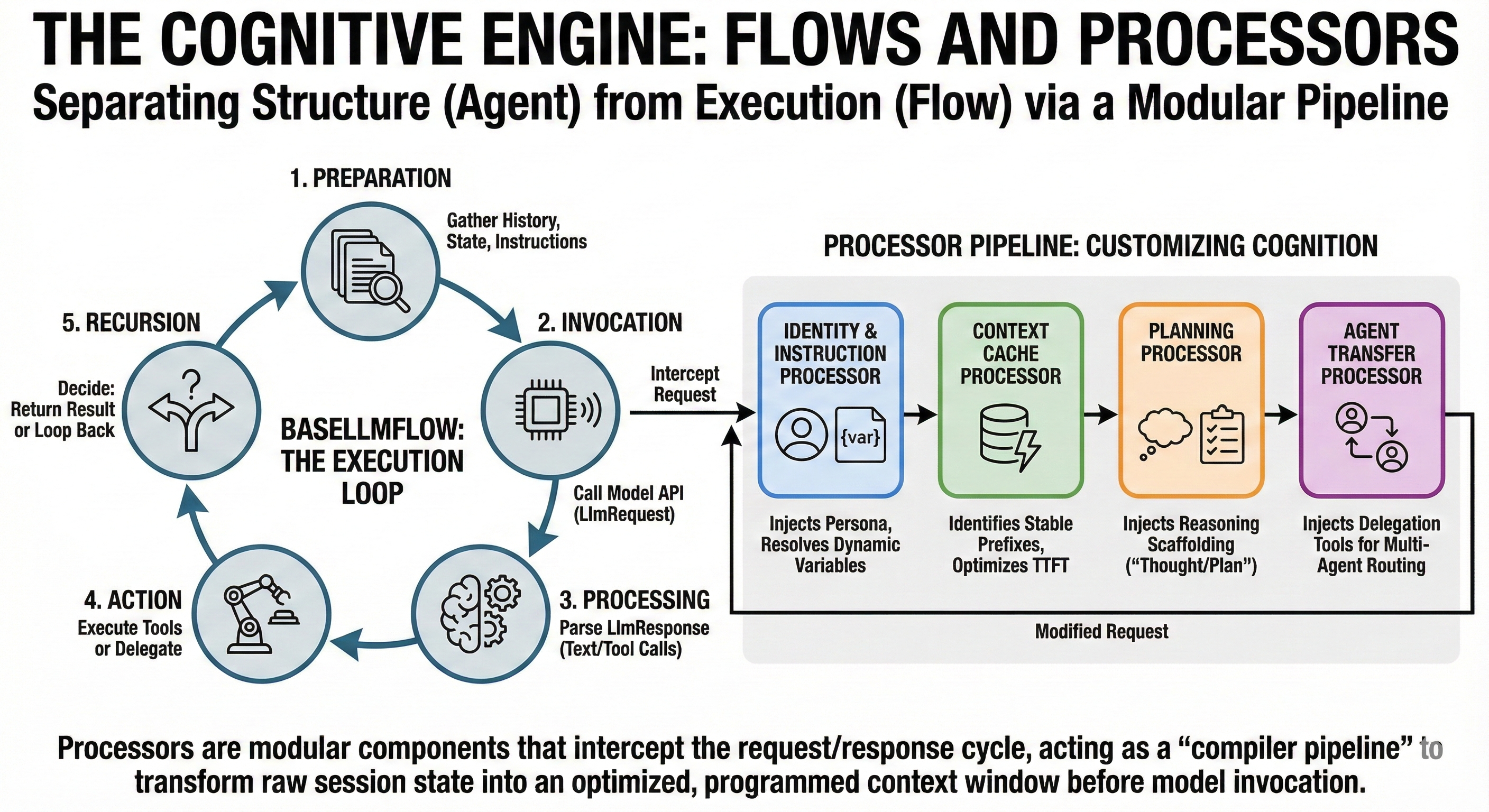
4.1 BaseLlmFlow: The Execution Loop
BaseLlmFlow defines the standard cognitive cycle:
- Preparation: Gathering history, state, instructions to build LlmRequest
- Invocation: Calling the model API
- Processing: Parsing LlmResponse for text or tool calls
- Action: Executing tools or delegating to other agents
- Recursion: Deciding whether to return result or feed tool output back for another turn
Separating Flow from Agent allows platform evolution of "best practices" (error handling, retry logic) without requiring developers to update specific agent definitions.
4.2 The Processor Pipeline: Customizing Cognition
The "Context as Compiled View" philosophy is implemented through Processors—modular components intercepting the request/response cycle.
4.2.1 Identity and Instruction Processors
IdentityProcessor and InstructionProcessor begin the pipeline:
Mechanism: Inject agent-specific instructions. InstructionProcessor resolves dynamic variables—if instruction contains
{user_name}, it looks up the value insession.stateand substitutes it.
Why: Enables dynamic templates rather than static strings, enabling personalization without code changes.
4.2.2 Context Cache Processor
As models grow, re-processing identical system instructions every turn becomes prohibitive. ContextCacheProcessor addresses this:
Mechanism: Analyzes current request to identify "Stable Prefixes"—unchanged prompt parts (e.g., 2,000-word system prompt). Communicates with backend to reuse cached attention mechanism for these tokens.
Impact: Can reduce time-to-first-token (TTFT) and inference costs by orders of magnitude for long-running agents.
from google.adk.apps import App
from google.genai.types import ContextCacheConfig

# Enable context caching at app level
app = App(
    context_cache_config=ContextCacheConfig(
        min_tokens=2048,      # Minimum prefix size to cache
        ttl_seconds=3600,     # Cache lifetime (1 hour)
        cache_intervals=10,   # Refresh after 10 uses
    ),
)

# Use static_instruction for maximum cache efficiency
agent = LlmAgent(
    name="CachedAgent",
    model="gemini-2.5-flash",
    static_instruction="Long unchanging system prompt...",  # Cached
)
4.2.3 Planning Processor
For complex tasks, simple prompting is insufficient. PlanningProcessor injects specific scaffolding to encourage planning before acting:
Mechanism: If a Planner (like PlanReActPlanner) is configured, appends instructions forcing the model to output "Thought" and "Plan" before generating tool calls.
Why: Implements "Chain of Thought" reasoning at infrastructure level, relieving developers from manual prompting.
4.2.4 Agent Transfer Processor
In Multi-Agent scenarios using AutoFlow, AgentTransferProcessor is vital:
Mechanism: Dynamically injects
transfer_to_agenttool definition. Generates descriptions of all available sub-agents and injects them into the system prompt.
Why: Gives the agent "meta-cognition"—awareness of its team. Allows the agent to know "I cannot handle this, but the 'Researcher' agent can" and invoke the transfer tool accordingly.
5. State Management: The Substrate of Continuity
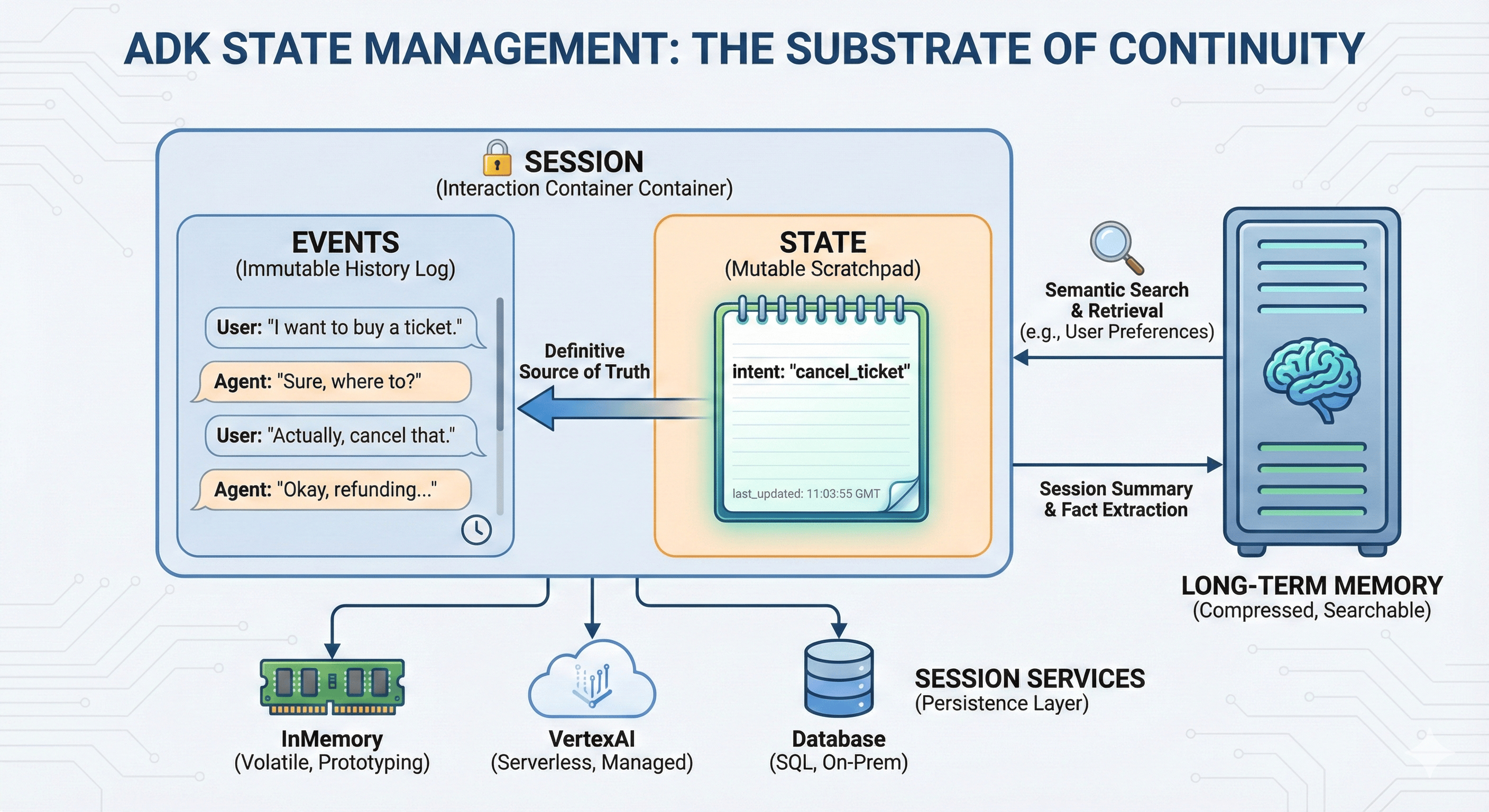
A recurring failure mode: conflating "History" (what was said) with "State" (what is true). ADK solves this by rigorously separating Session, State, and Memory.
5.1 Sessions: The Container of Interaction
A Session is the fundamental unit of isolation, representing a single conversation thread.
- Isolation: Data from one session never bleeds into another, ensuring privacy and security
- Components: Contains Events (immutable interaction log) and State (mutable variables)
5.2 The Persistence Layer: Session Services
ADK employs the Repository pattern for session management, allowing swappable storage backends:
5.2.1 InMemorySessionService
- Mechanism: Stores session data in application RAM (Python dictionary)
- Use Case: Strictly for local prototyping and unit testing
- Critical Warning: In production environments like Google Cloud Run (stateless), container restart wipes all data. ADK CLI defaults to this service—a trap for unwary developers moving to production.
5.2.2 VertexAiSessionService
- Mechanism: Offloads session management to Google Cloud Vertex AI Agent Engine
- Why: The "Serverless" approach. Provides durability, scalability, and integration with broader Vertex ecosystem without database management overhead.
5.2.3 DatabaseSessionService
- Mechanism: Connects to SQL database (PostgreSQL, SQLite)
- Why: For enterprises with strict data residency requirements or existing database infrastructure, allows full control over session data schema and lifecycle.
5.3 State: The Mutable Scratchpad
While Events track history, session.state tracks current context:
- The Problem: If a user says "I want to buy a ticket," then "Actually, cancel that," history contains a contradiction. An agent reading full history must expend cognitive effort to resolve this.
- The Solution: Agent updates a variable
intent: "cancel_ticket"insession.state. This provides a definitive "source of truth" without re-interpretation. - Context Control: Primary mechanism for
include_contents='none'pattern. By injecting specific state variables into agent instructions, developers provide only necessary context (e.g.,user_name,order_id) without polluting the context window with entire chat history.
from google.adk.agents.callback_context import CallbackContext

async def update_intent_tool(context: CallbackContext, new_intent: str):
    """Update the user's current intent in session state."""
    # Access and modify session state
    await context.session.state.set("intent", new_intent)
    await context.session.state.set("last_updated", context.session.current_time())
    return f"Intent updated to: {new_intent}"

async def get_context_tool(context: CallbackContext):
    """Retrieve current state without full history."""
    intent = await context.session.state.get("intent")
    user_name = await context.session.state.get("user_name")
    return f"User {user_name} wants to: {intent}"
State solves the within-session context problem. But what happens when the session ends? State is session-scoped—when a user returns days or weeks later, that state is gone. For agents that must remember facts across time spans, we need a different abstraction entirely.
6. Memory Systems: Bridging the Temporal Gap
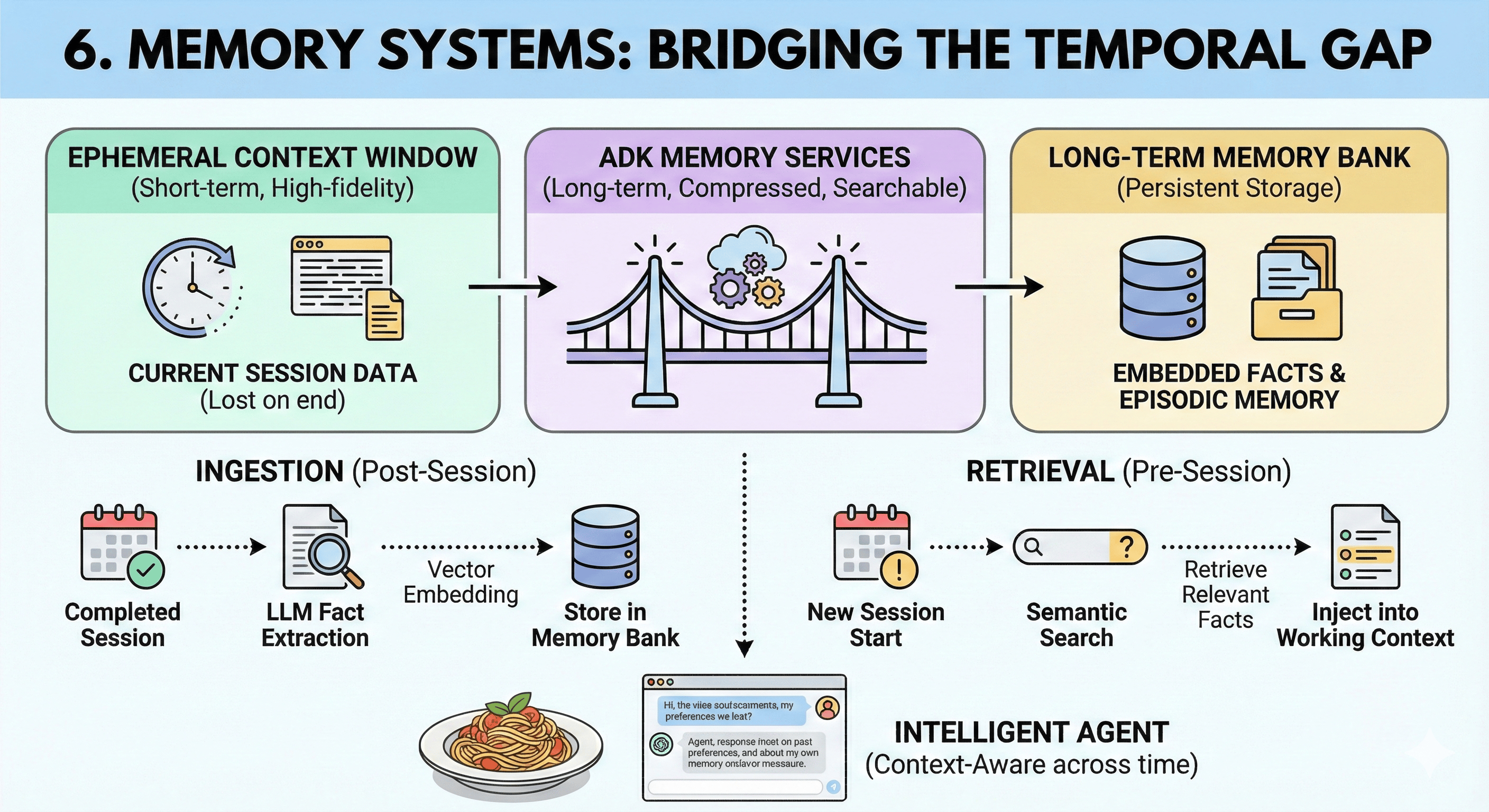
State provides continuity within a conversation. Memory provides continuity across conversations. The Context Window, however large, is ephemeral—it clears when a session ends. To build agents that "know" a user over months or years, ADK introduces Memory Services.
6.1 The Distinction: Context vs. Memory
- Context: Short-term, high-fidelity, expensive. "Working Memory."
- Memory: Long-term, compressed, searchable. "Long-Term Storage."
6.2 VertexAiMemoryBankService
The ADK provides sophisticated long-term memory via VertexAiMemoryBankService:
- Ingestion (
add_session_to_memory): Not a simple text dump. The service uses an LLM to "read" completed sessions and extract salient facts (e.g., "User prefers aisle seats," "User is allergic to peanuts"). These facts are vector-embedded and stored. - Retrieval (
search_memory): When a new session begins, the agent can semantically search this memory bank. - The "Why": Enables "Episodic Memory." An agent can recall a detail from three months ago without loading three months of chat logs into the context window. This drastically reduces cost and latency while increasing perceived intelligence.
from google.adk.memory import InMemoryMemoryService

memory_service = InMemoryMemoryService()

# After session completes, add to long-term memory
await memory_service.add_session_to_memory(session)

# In a new session, search for relevant past context
async def recall_preferences_tool(context: CallbackContext, query: str):
    """Search long-term memory for user preferences."""
    results = await context.memory_service.search_memory(query=query)
    return results
We've covered how single agents remember within and across sessions. But complex problems often exceed a single agent's capabilities. When tasks require specialized expertise, coordinating multiple agents becomes essential.
7. Multi-Agent Systems (MAS): Orchestration and Delegation
Single agents have limits—bounded context windows, limited tool sets, single cognitive profiles. Complex enterprise workflows demand specialization. ADK's true power emerges in Multi-Agent Systems (MAS), providing primitives for hierarchical, decentralized, or swarm-based agent networks.
7.1 The Delegation Mechanism
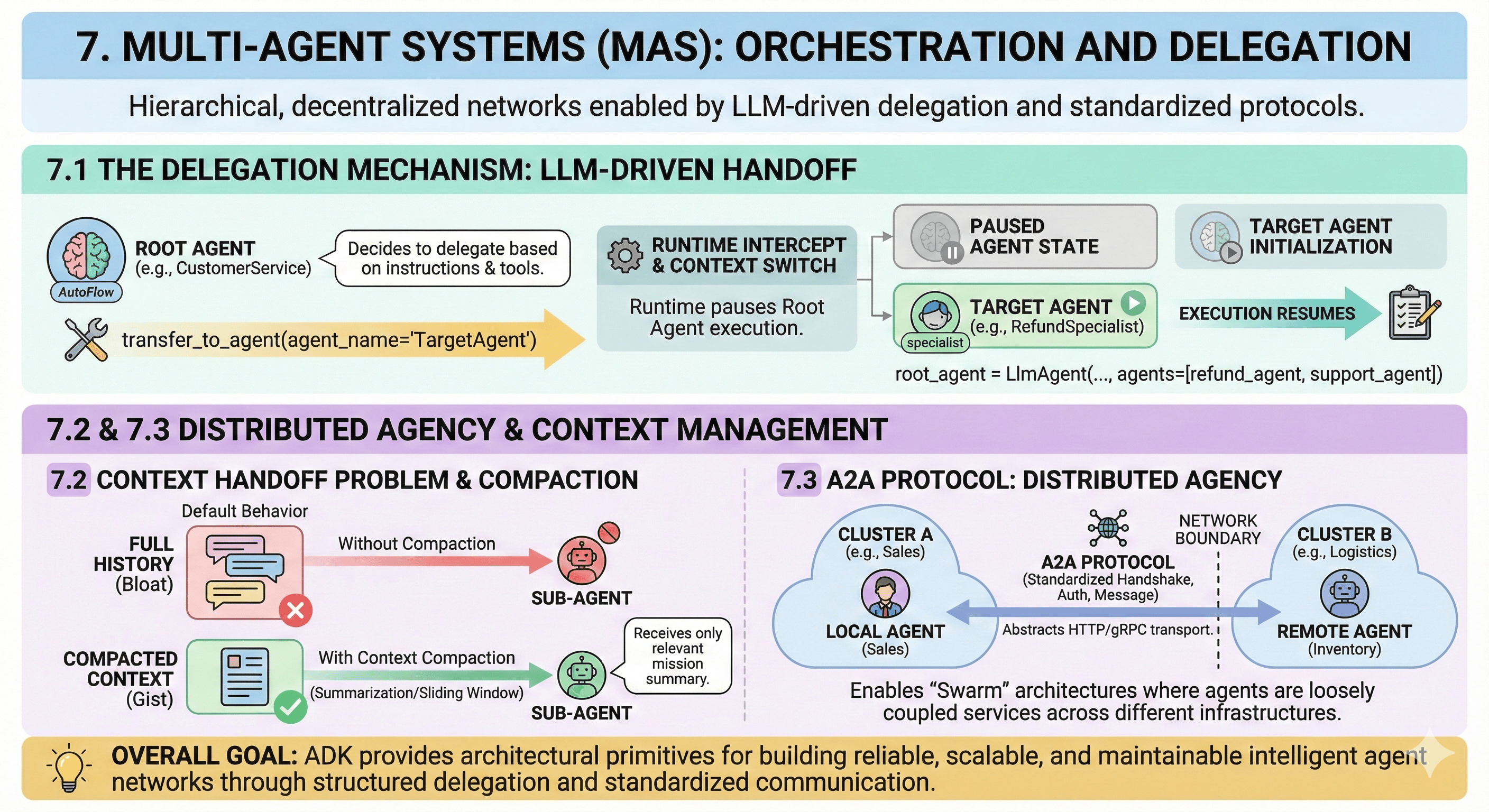
How does one agent "talk" to another? In ADK, this is handled via LLM-Driven Delegation:
- The
transfer_to_agentTool: When an agent is configured with sub-agents, AutoFlow automatically equips it with a special tool:transfer_to_agent(agent_name="TargetAgent") - The Logic: The LLM, based on its instructions and sub-agent descriptions, decides when to call this tool
- The Runtime Handoff: When the tool is called, Runtime intercepts the request. It does not merely execute a function; it performs a Context Switch. It pauses calling agent (Root) execution and initializes target agent (Specialist) execution.
from google.adk.agents import LlmAgent
from google.adk.flows import AutoFlow

# Define specialist agents
refund_agent = LlmAgent(
    name="RefundSpecialist",
    description="Handles customer refund requests",
    model="gemini-2.5-flash",
)

support_agent = LlmAgent(
    name="SupportSpecialist",
    description="Handles technical support questions",
    model="gemini-2.5-flash",
)

# Root agent with sub-agents - AutoFlow adds transfer_to_agent tool
root_agent = LlmAgent(
    name="CustomerService",
    model="gemini-2.5-flash",
    agents=[refund_agent, support_agent],  # Sub-agents available for delegation
)
7.2 The Context Handoff Problem
A critical architectural challenge in MAS: determining what context passes from caller to callee.
- Default Behavior: By default, sub-agent might inherit full history (
include_contents='default'). In deep delegation chains (Root → Manager → Specialist → Worker), this leads to context bloat. - Context Compaction: To mitigate this, ADK supports Context Compaction. This feature uses sliding windows or summarization models to compress history before passing to sub-agent. Sub-agent receives the "gist" of the mission without entire thread noise.
7.3 The A2A Protocol: Distributed Agency
For systems spanning network boundaries (e.g., microservices), ADK introduces the Agent-to-Agent (A2A) Protocol:
- The "Why": In large enterprises, "Sales Agent" might be owned by Sales Engineering, while "Inventory Agent" is owned by Logistics. They run on different clusters, perhaps different clouds.
- The Mechanism: A2A standardizes handshake, authentication, and message format for remote agent invocation. It abstracts HTTP/gRPC transport, allowing a local agent to treat a remote agent like any other sub-agent. This enables "Swarm" architectures where agents are loosely coupled services.
Multi-agent coordination handles task delegation. But what happens when agents need to reason about non-textual data? Real-world workflows demand processing of documents, images, and media files.
8. The Artifact Subsystem: Managing Binary Reality
Tools handle function calls and API interactions. But agents do not live in text-only worlds. They must process PDFs, images, spreadsheets, and audio. ADK manages these via the Artifact Subsystem.
8.1 The Artifact Pattern
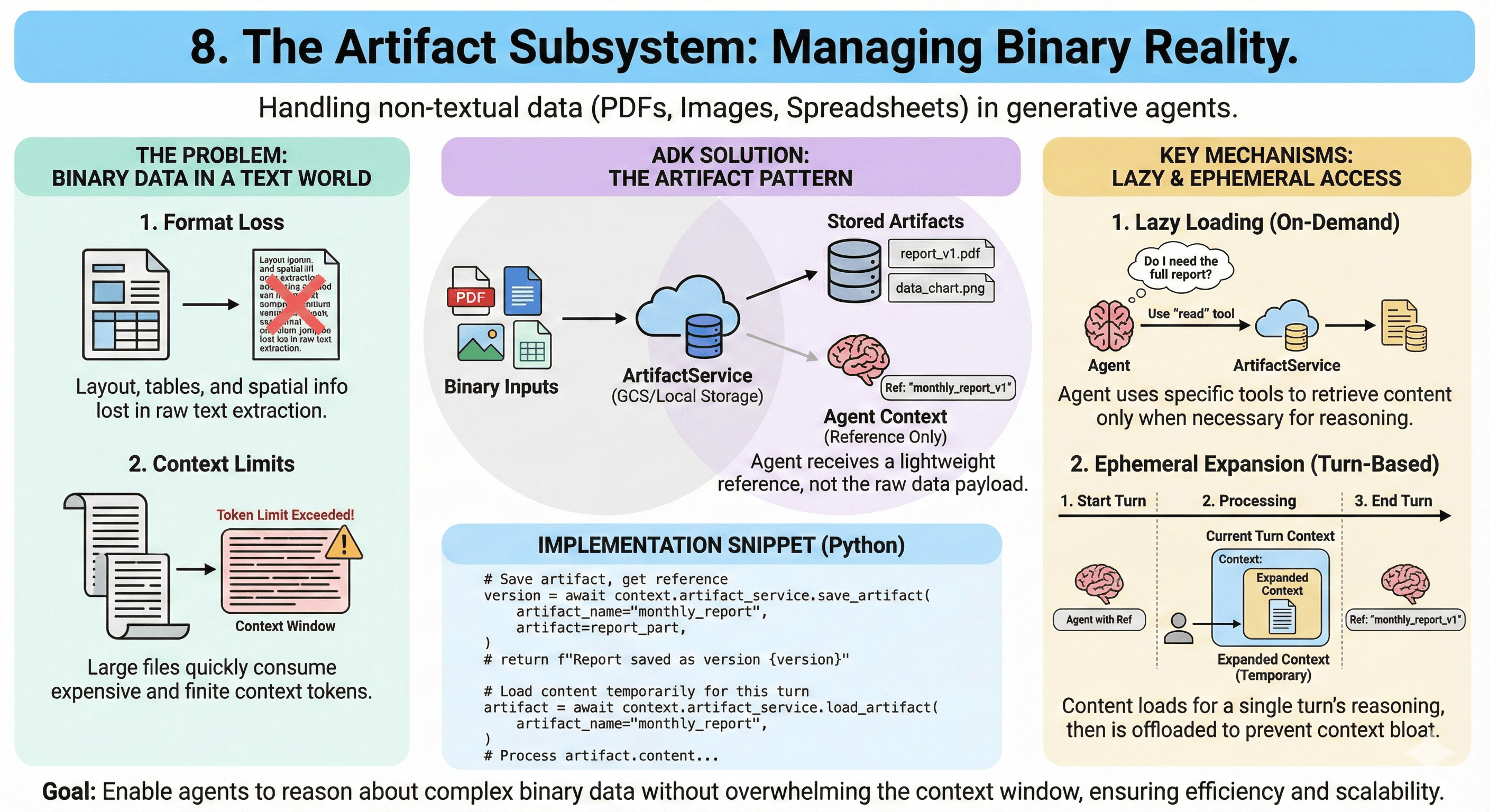
Why not just paste PDF text into the prompt?
- Format Loss: PDFs contain spatial information (layout, tables) lost in plain text extraction
- Context Limits: Large files exceed token limits
ADK treats these files as Artifacts. They are stored in an ArtifactService (GCS or local), and the agent is given a reference to the artifact.
- Lazy Loading: Agent might receive a file summary. Only if it decides it needs raw data does it use a specific tool to "read" the artifact.
- Ephemeral Expansion: ADK supports loading artifact content into the context window for a specific turn and then offloading it. This dynamic context management ensures the agent has data when needed for reasoning, but doesn't carry "dead weight" for the rest of the session.
from google.adk.agents.callback_context import CallbackContext
import google.genai.types as types

async def save_report_artifact(context: CallbackContext, report_bytes: bytes):
    """Save a report as an artifact and return reference."""
    report_part = types.Part.from_bytes(
        data=report_bytes,
        mime_type="application/pdf"
    )
    version = await context.artifact_service.save_artifact(
        artifact_name="monthly_report",
        artifact=report_part,
    )
    return f"Report saved as artifact version {version}"

async def load_artifact(context: CallbackContext, artifact_name: str):
    """Load artifact content for processing."""
    artifact = await context.artifact_service.load_artifact(
        artifact_name=artifact_name,
    )
    return artifact  # Available for current turn only
9. Tooling: The Bridge to Determinism
Tools are the agent's hands. In ADK, creating a tool is Pythonically simple, but the underlying machinery is sophisticated.
9.1 Definition by Inspection
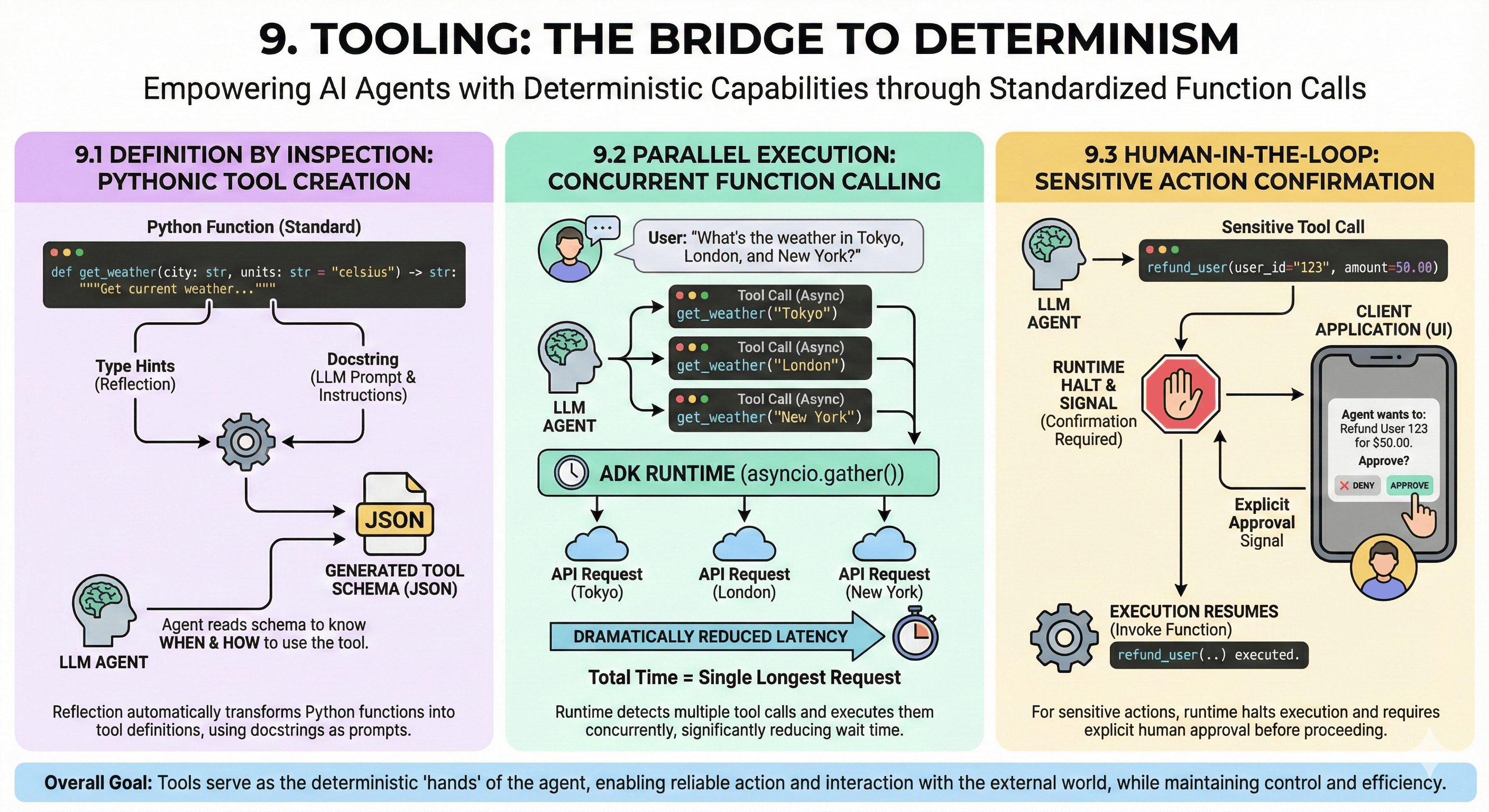
ADK uses reflection to turn standard Python functions into tool definitions:
- Type Hints: Framework reads Python type hints (
str,int,Optional) to generate JSON schema for the tool - Docstrings as Prompts: The function's docstring is not just documentation; it is the prompt telling the LLM when and how to use the tool. A well-written docstring is critical for agent cognitive performance.
def get_weather(city: str, units: str = "celsius") -> str:
    """Get the current weather for a specific city.

    Use this tool when the user asks about weather conditions.

    Args:
        city: The name of the city (e.g., "Tokyo", "London")
        units: Temperature units, either "celsius" or "fahrenheit"

    Returns:
        Weather description with temperature
    """
    # ADK automatically converts this function to a tool definition
    # Type hints generate JSON schema, docstring guides LLM usage
    return f"Weather in {city}: 22°{units[0].upper()}, sunny"

# Register tool with agent
agent = LlmAgent(
    name="WeatherAgent",
    model="gemini-2.5-flash",
    tools=[get_weather],
)
9.2 Parallel Execution
ADK Runtime supports Parallel Function Calling out of the box:
- Scenario: User asks "What is the weather in Tokyo, London, and New York?"
- Execution: LLM generates three distinct tool calls. Runtime detects this and executes them concurrently using
asyncio.gather() - Impact: Dramatically reduces latency. Instead of waiting for three sequential HTTP requests, user waits for duration of single longest request.
9.3 Human-in-the-Loop
For sensitive actions (e.g., "Refund User", "Delete Database"), autonomy is a risk. ADK supports Tool Confirmations:
- Mechanism: A tool can be configured to require confirmation. When the agent attempts to call it, Runtime halts execution and sends a signal to the client application (UI). The human user must explicitly approve the action before Runtime resumes execution and actually invokes the function.
10. Implementation and Observability
Architecture and capabilities mean nothing if the system cannot run reliably in production. Transitioning from prototype to production requires attention to environment constraints and observability infrastructure.
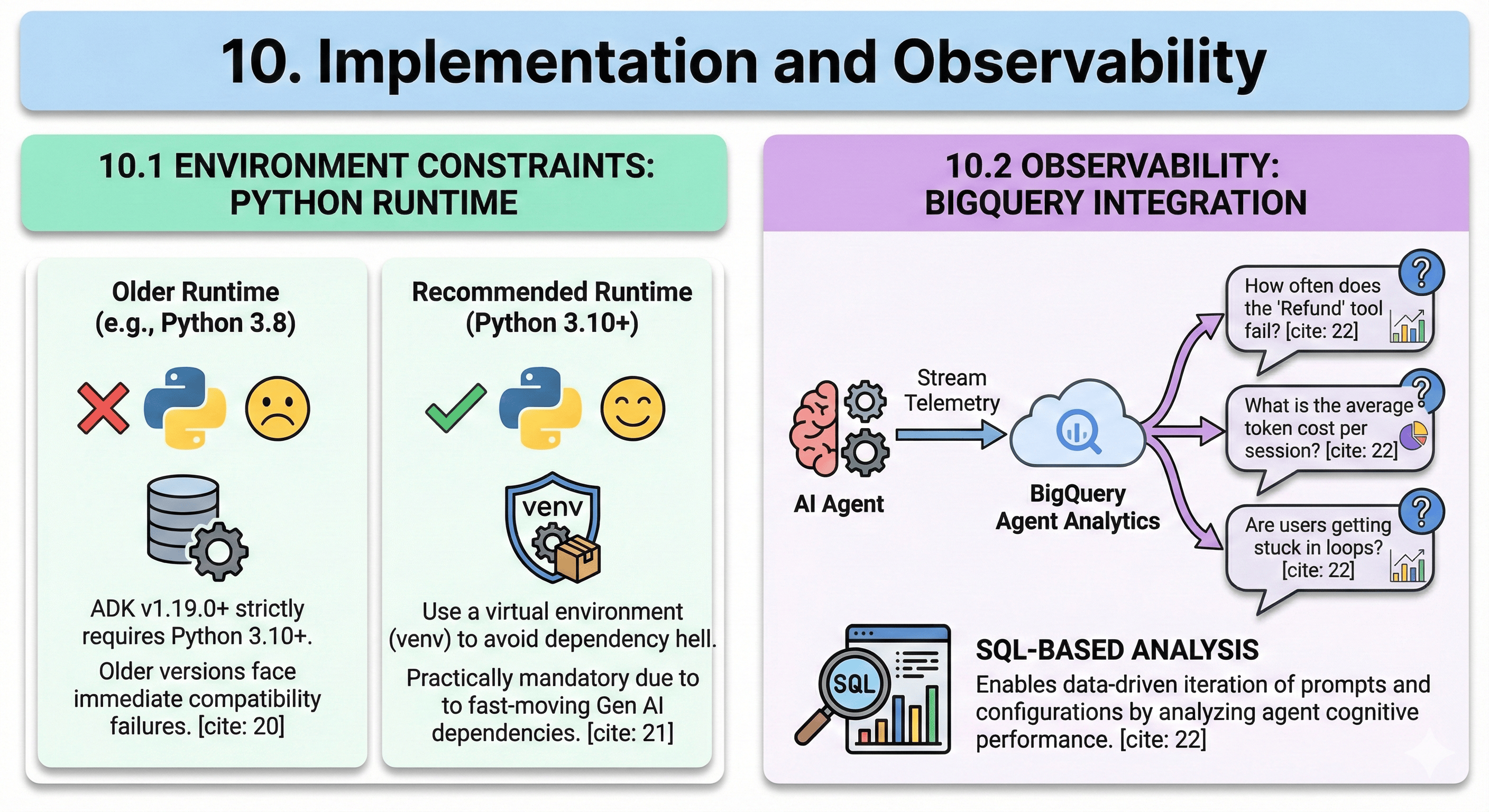
10.1 Environment Constraints
ADK is built on modern Python features:
- Requirement: ADK v1.19.0+ strictly requires Python 3.10 or higher. Developers attempting to run it on older environments will face immediate compatibility failures.
- Virtual Environments: Due to fast-moving Gen AI dependencies, using a virtual environment (venv) is practically mandatory to avoid dependency hell.
10.2 Observability: A Multi-Layer Strategy
You cannot optimize what you cannot measure.
Production agent systems require observability at multiple levels: operational metrics, cognitive performance, and distributed tracing. ADK and the broader ecosystem provide three complementary approaches.
10.2.1 BigQuery Agent Analytics: Cognitive Performance Analysis
ADK provides deep integration with Google Cloud BigQuery for analytics:
- The "Why": In production, you need to answer questions like: "How often does the 'Refund' tool fail?", "What is the average token cost per session?", "Are users getting stuck in loops?"
- The Mechanism: BigQuery Agent Analytics tool allows developers to stream telemetry data directly to BigQuery. This enables SQL-based analysis of agent cognitive performance, allowing for data-driven iteration of prompts and configurations.
- Use Cases: Aggregate analysis, cost attribution per agent/session, tool success rates, context window utilization trends, A/B testing of prompts
from google.adk.observability import BigQueryObserver

# Configure BigQuery telemetry streaming
observer = BigQueryObserver(
    project_id="my-project",
    dataset_id="agent_telemetry",
    table_id="agent_events",
)

# Attach to app for automatic event streaming
app = App(
    agent=root_agent,
    observers=[observer],
)

# Query insights via SQL
"""
SELECT
  agent_name,
  AVG(token_count) as avg_tokens,
  AVG(latency_ms) as avg_latency,
  COUNT(CASE WHEN status='error' THEN 1 END) as error_count
FROM agent_telemetry.agent_events
WHERE DATE(timestamp) = CURRENT_DATE()
GROUP BY agent_name
"""
10.2.2 MLflow for GenAI: Experiment Tracking and LLM Observability
MLflow provides experiment tracking, model versioning, and specialized GenAI observability:
- The "Why": Agent development is iterative—you need to track which prompt variations, temperature settings, or tool configurations produce optimal results. MLflow provides a structured framework for experimentation and comparison.
- Tracing for GenAI: MLflow 2.8+ includes native LLM tracing capabilities. It automatically captures LLM calls, token counts, latencies, and embeddings as structured traces. This is critical for debugging multi-turn agent conversations and understanding where cognitive failures occur.
- Integration Pattern: MLflow operates at the experiment/development layer. During development, log each agent configuration as an MLflow experiment. In production, use MLflow tracing to capture detailed execution traces for representative sessions or failed interactions.
import mlflow
from mlflow.tracking import MlflowClient

# Track agent experiments during development
mlflow.set_experiment("agent_prompt_optimization")

with mlflow.start_run(run_name="refund_agent_v3"):
    # Log agent configuration as parameters
    mlflow.log_param("model", "gemini-2.5-flash")
    mlflow.log_param("temperature", 0.3)
    mlflow.log_param("prompt_version", "v3_with_cot")

    # Run agent evaluation
    result = evaluate_agent(agent, test_cases)

    # Log performance metrics
    mlflow.log_metric("success_rate", result.success_rate)
    mlflow.log_metric("avg_latency_ms", result.avg_latency)
    mlflow.log_metric("avg_cost_per_session", result.avg_cost)

    # Log prompt as artifact
    mlflow.log_text(agent.instruction, "prompt.txt")

# Enable MLflow tracing for production debugging
mlflow.langchain.autolog()  # Auto-trace LangChain/ADK agent calls

# Or manual span creation for fine-grained control
with mlflow.start_span(name="refund_processing") as span:
    span.set_inputs({"user_request": user_input})
    result = await agent.run(user_input)
    span.set_outputs({"agent_response": result})
    span.set_attribute("token_count", result.token_count)
10.2.3 OpenTelemetry: Distributed Tracing and Operational Observability
OpenTelemetry (OTel) provides vendor-neutral instrumentation for distributed tracing and metrics:
- The "Why": In Multi-Agent Systems, especially those using A2A protocol across microservices, understanding the full request path is critical. Which agent took how long? Where did context get dropped? OpenTelemetry traces the entire distributed execution DAG.
- The Mechanism: OTel uses the concept of Spans (units of work) organized into Traces (end-to-end request flows). Each agent invocation, tool call, or delegation becomes a span. Parent-child relationships between spans reveal the execution hierarchy.
- Integration: Instrument ADK agents by wrapping key execution points (flow invocation, tool execution, agent transfer) with OTel spans. Export traces to backends like Jaeger, Grafana Tempo, or Google Cloud Trace.
from opentelemetry import trace
from opentelemetry.exporter.cloud_trace import CloudTraceSpanExporter
from opentelemetry.sdk.trace import TracerProvider
from opentelemetry.sdk.trace.export import BatchSpanProcessor

# Configure OpenTelemetry with Google Cloud Trace backend
tracer_provider = TracerProvider()
cloud_trace_exporter = CloudTraceSpanExporter()
tracer_provider.add_span_processor(
    BatchSpanProcessor(cloud_trace_exporter)
)
trace.set_tracer_provider(tracer_provider)

tracer = trace.get_tracer(__name__)

# Instrument agent execution with spans
async def instrumented_agent_run(agent, user_input):
    with tracer.start_as_current_span(
        "agent.run",
        attributes={
            "agent.name": agent.name,
            "agent.model": agent.model,
        }
    ) as span:
        try:
            result = await agent.run(user_input)
            span.set_attribute("token.input", result.input_tokens)
            span.set_attribute("token.output", result.output_tokens)
            span.set_status(trace.Status(trace.StatusCode.OK))
            return result
        except Exception as e:
            span.set_status(trace.Status(trace.StatusCode.ERROR))
            span.record_exception(e)
            raise
10.2.4 The Observability Stack: Choosing Your Layer
| Tool | Primary Focus | Best For | Integration Effort |
|---|---|---|---|
| BigQuery Analytics | Aggregate cognitive metrics | Cost analysis, A/B testing, trend analysis | Low (native ADK support) |
| MLflow | Experiment tracking, LLM tracing | Development iteration, prompt optimization, model comparison | Medium (requires explicit logging) |
| OpenTelemetry | Distributed tracing, operational metrics | Multi-agent systems, latency debugging, A2A architectures | High (requires span instrumentation) |
Recommended Strategy: Use all three in concert:
- Development: MLflow for experiment tracking and prompt optimization
- Production: OpenTelemetry for request-level distributed tracing and real-time operational metrics
- Analytics: BigQuery for aggregate analysis, cost attribution, and long-term trend analysis
This multi-layer observability strategy ensures you can debug individual requests (OTel), optimize agent configurations (MLflow), and understand system-wide performance (BigQuery).
11. Conclusion: The Era of Engineered Agency
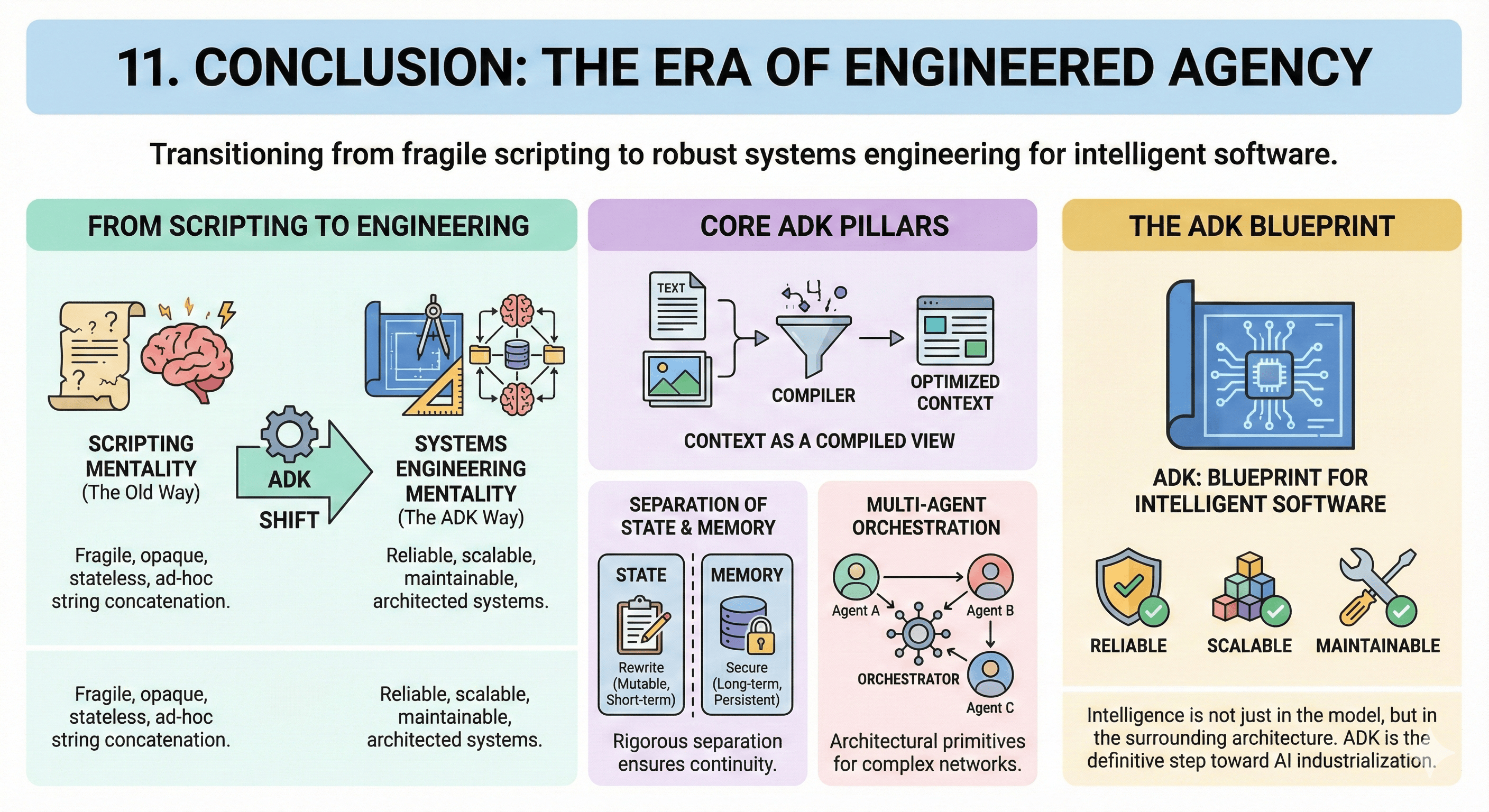
We began with context engineering as a paradigm shift. We've journeyed through agent anatomy, execution flows, state management, memory systems, multi-agent coordination, tools, artifacts, and observability. The Google Gen AI Agent Development Kit represents a definitive step toward AI industrialization. It moves the field from the "scripting" mentality—where agents are fragile, opaque, and stateless—toward a "systems engineering" mentality.
By treating Context as a Compiled View, enforcing rigorous separation of State and Memory, and providing architectural primitives for Multi-Agent Orchestration, the ADK empowers architects to build systems that are reliable, scalable, and maintainable.
It acknowledges that agent "intelligence" is not just in model weights, but in the architecture surrounding it. For the professional domain expert, the ADK is not just a toolkit; it is a blueprint for the future of intelligent software.
Reference Tables
Session Service Comparison
| Feature | InMemorySessionService | DatabaseSessionService | VertexAiSessionService |
|---|---|---|---|
| Persistence | None (Volatile) | High (SQL Backend) | High (Managed Service) |
| Scalability | Single Instance | Vertical/Horizontal DB Scaling | Cloud-Native / Serverless |
| Setup Complexity | Zero (Default) | Medium (Requires DB) | Low (Requires GCP Project) |
| Primary Use Case | Local Prototyping | On-Prem / Hybrid Cloud | Cloud-Native Production |
| Risk | Data loss on restart | Schema management overhead | API Costs / Vendor Lock-in |
ADK Processor Pipeline
| Order | Processor Name | Function & "Why" |
|---|---|---|
| 1 | IdentityProcessor | Injects agent name/role. Establishes self-awareness. |
| 2 | InstructionProcessor | Compiles dynamic prompts ({var}). Enables personalization. |
| 3 | ContextCacheProcessor | Checks/Injects cache tokens. Reduces cost/latency. |
| 4 | PlanningProcessor | Injects reasoning scaffolding. Forces "Chain of Thought." |
| 5 | CodeExecutionProcessor | Prepares code execution environment. Enables dynamic computation. |
| 6 | AgentTransferProcessor | Injects delegation tools. Enables Multi-Agent routing. |
Workflow Agent Types
| Agent Type | Execution Logic | Ideal Use Case |
|---|---|---|
| SequentialAgent | Linear (A → B → C) | Data Pipelines, Strict SOPs |
| ParallelAgent | Concurrent (A + B + C) | Research, Fan-Out Tasks |
| LoopAgent | Iterative (A → Check → A) | Coding, Self-Correction, Refinement |
Resources
Official Google ADK Resources
- ADK GitHub Repository: github.com/google/adk-python
- Official Documentation: google.github.io/adk-docs
- Google Cloud Agent Engine: Cloud Agent Engine Docs
Community and Tutorials
- ADK Deep Dives: iamulya.one
- Context Engineering Blog: developers.googleblog.com